
iced logo generation

Create a Hyper-Realistic Frozen Wallas Logo Poster in CGI: The Ultimate AI Art Prompt Guide
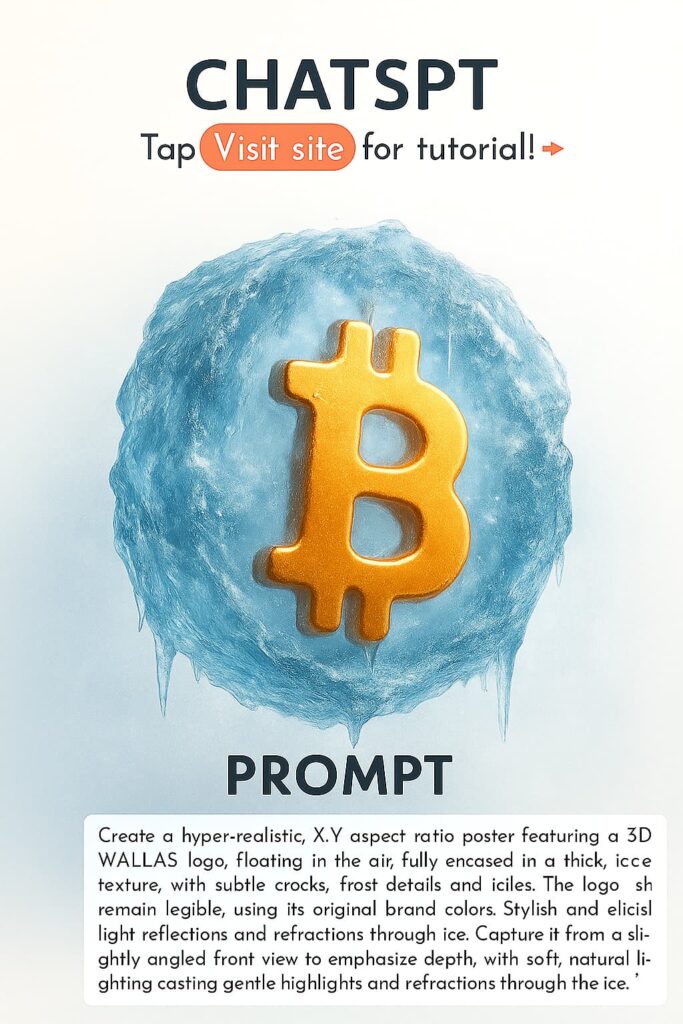
Looking to create a jaw-dropping, hyper-realistic CGI poster featuring the Wallas logo encased in thick, crystalline ice? This advanced AI art prompt is crafted for digital designers, CGI artists, and branding creatives who want to produce premium, high-impact visuals with stunning texture accuracy, dramatic lighting, and a clean, cool-toned aesthetic
Whether you’re designing brand visuals, marketing mockups, product showcases, or portfolio-quality 3D art, this guide emphasizes ice realism, light behavior, logo clarity, and cinematic CGI detail — perfect for striking winter-themed or high-tech campaigns.
Whether you’re aiming to produce hyperrealistic 3D art for portfolios, Pinterest visuals, branding, or digital decor, this prompt’s focus on material authenticity, subtle paper imperfections, and soft studio lighting makes it a go-to for refined and elegant 3D compositions.
pro tip
–v 5.2 –ar 1:1 –style 4c –q 2
🔥 Prompt:
Create a hyper-realistic [X:Y] aspect ratio poster featuring a 3D [wallas] logo, floating on the air, fully encased in a thick, glistening ice texture, with subtle cracks, frost details and icicles. The logo should remain legible, using its original brand colors. Stylish and realistic light reflections and refractions through ice. Capture it from a slightly angled front view to emphasize depth, with soft, natural lighting casting gentle highlights and refractions through the ice. The background should be a subtle, frosty gradient, emphasizing the icy theme. Use a cool-toned palette—crystalline blues, soft whites, and faint silvers—rendered in ultra-detailed CGI style for a striking, photorealistic finish.
⭐ Pro Tips for Maximum Visual Impact
- Subtle post-processing to enhance contrast and micro-detail.
- Use high-resolution paper textures or procedural fibers for natural variation.
- Combine soft GI with delicate rim lighting for depth.
- Render at larger dimensions (e.g., 4:5, 3:4) for social platform optimization.
Refined Prompt Variation:
“Photorealistic 3D render of a dual-toned origami girl with glasses, floating above a pristine white matte surface. Features detailed paper textures—creases, soft crumples, and faint fingerprints—illuminated by gentle studio lighting from a medium-low angle. A minimalist composition emphasizing lifelike material accuracy, handcrafted detail, and dual-tone paper design with pearl white highlights.”
🧠 Why This Prompt Works
Ice Texture Realism
The combination of cracks, frost buildup, icicles, and glistening transparency ensures the ice feels heavy, tactile, and physically believable.
Brand Clarity Preserved
Even though the logo is frozen inside a solid block of ice, it remains entirely legible and visually consistent with its brand identity.
Cinematic CGI Lighting
Soft, natural lighting with controlled highlights produces premium reflections, refractions, and depth — essential for photorealistic ice.
Floating 3D Composition
The logo hovering in mid-air adds modernity, elegance, and a sleek futuristic tone ideal for posters, branding, or advertising visuals.
Frosted Gradient Background
A minimal cool-toned gradient enhances the icy theme without fighting for attention.
Cool-Toned Color Palette
Crystalline blues, faint silvers, and soft whites enhance realism and visual sophistication.
🎯 Best Use Cases
- Branding Concepts & Campaign Visuals
Perfect for winter promotions, product announcements, or high-tech brand themes. - Wall Art & Prints
Great for modern décor, company offices, or design-focused interiors. - Digital Portfolios
Showcase CGI expertise, especially in transparent materials, light physics, and high-fidelity rendering. - Social Media & Pinterest
Eye-catching visual style ideal for vertical content or polished portfolio posts. - Advertising Mockups
Strong for seasonal ads, packaging visuals, or futuristic brand direction concepts.
Try adapting this effect for other logos, numbers, symbols, or even objects trapped inside ice for a dramatic storyline.
Ultra-Detailed CGI Finish
Premium Photorealistic Ice
DSLR-Quality Clarity
📐 Aspect Ratio Tips
You can choose any X:Y format depending on platform:
- 2:3 – Posters, Pinterest
- 4:5 – Instagram
- 1:1 – Social media profiles
- 16:9 – Landscape banners, YouTube thumbnails
📌 How to Customize This Prompt
- Swap the Wallas logo for any brand symbol.
- Add thicker icicles or cracked glass-like fracturing for dramatic intensity.
- Use deeper blues for a darker, colder tone.
- Introduce rim lighting for stronger silhouette separation.
- Add gentle falling snow or mist for extra atmosphere.
- Increase transparency to make the logo appear more embedded inside the ice.
⭐ Pro Tips for Maximum Impact
- Use high-gloss ice shaders for realistic light scattering.
- Add subsurface scattering for natural icy translucency.
- Enhance micro-details like frost crystals for macro-level realism.
- Keep lighting soft to avoid overpowering the logo’s original colors.
- Boost sharpness slightly in post for extra clarity.
Refined Prompt Variation:
“Hyper-realistic X:Y CGI poster with a floating 3D Wallas logo fully encased in thick, glistening ice with frost, cracks, and icicles. Soft natural lighting highlights realistic refractions through the ice. Cool-toned palette with a subtle frosty background gradient. Crisp, high-resolution, photorealistic finish.”
🌀 Why Frozen Logo Designs Are Trending
Freezing logos or objects inside hyper-detailed ice blocks creates a dramatic visual metaphor: durability, strength, purity, and resilience. This aesthetic is currently popular in advertising, CGI concept art, and social media design because it combines brand clarity with luxurious, high-impact visual storytelling. This prompt enables artists to create premium, futuristic imagery that stands out instantly in any feed.